


一、Main parameters of LA/LB series electronic centrifugal switch
| Product number | voltage range | Motor maximum peak current | Recommended motor power range | Applicable motor conditions | Continuous switch test Switching interval time |
|
| Intelligent general purpose Self-learning series YC-LA |
YC-LA050 | 185-240 | lmax<10A | 0-550W | The interval between motor stop and start is 3 seconds | open 200 ms off for 30 seconds |
| YC-LA220 | 185-240 | lmax<40A | 0-2200W | The interval between motor stop and start is 3 seconds | open 200 ms Off for 31 seconds |
|
| YC-LA300 | 185-240 | lmax<60A | 0-3000W | The interval between motor stop and start is 3 seconds | open 200 ms off 32 seconds |
|
| YC-LA430 | 185-240 | lmax<75A | 0-4000W | The interval between motor stop and start is 3 seconds | open 200 ms Off for 33 seconds |
|
| Intelligent general purpose Self-learning series YC-LB |
YC-LB050 | 95-140 | lmax<20A | 0-550W | The interval between motor stop and start is 3 seconds | open 200 ms off 90 seconds |
| YC-LB220 | 95-140 | lmax<75A | 0-2200W | The interval between motor stop and start is 3 seconds | open 200 ms Off for 91 seconds |
|
| YC-LB300 | 95-140 | lmax<90A | 0-3000W | The interval between motor stop and start is 3 seconds | open 200 ms off 92 seconds |
二、The role of electronic centrifugal switch
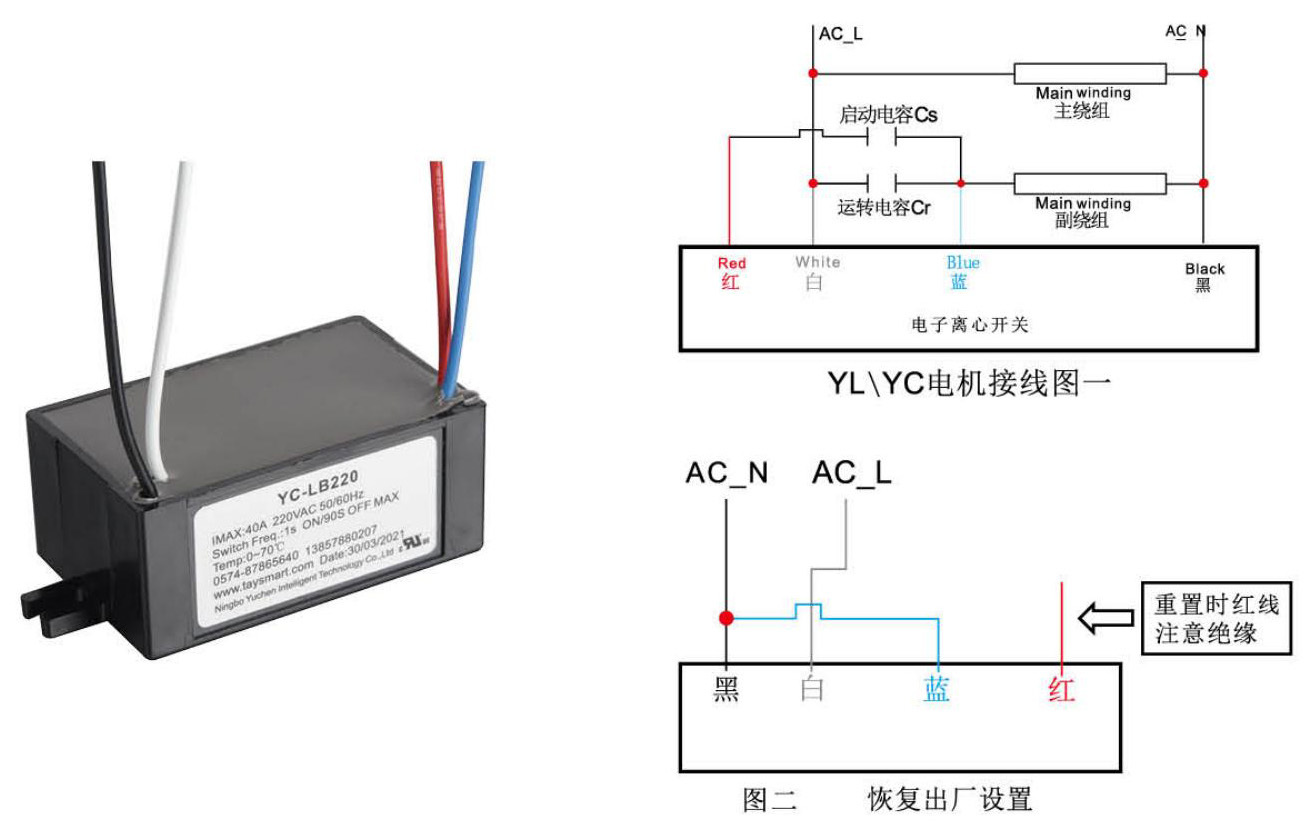
Electronic centrifugal switch is used on single-phase capacitor starting motor as a device switch for starting capacitor auxiliary starting. When the motor starts, the triac of the electronic centrifugal switch is turned on. When the motor speed reaches 60%-80% of the rated speed %, cut off the starting capacitor, the triac is turned off, when the motor speed is lower than 80%-60% of the rated speed, turn on the starting capacitor of the motor to achieve the role of auxiliary starting.
三、Instructions for use of LA/LB series electronic centrifugal switches
Parameter learning of centrifugal switch
1. Please ensure that the circuit connection of the electronic centrifugal switch is correct and good before the first power-on.
2. For the wiring diagram, please refer to the corresponding electronic centrifugal switch wiring (Figure 1).
3. Please make sure that the motor is rated voltage and rated frequency.
4, and in line with the selected electronic centrifugal switch power range.
5. Please ensure that the load of the motor is no-load (note that you cannot use the variable frequency power supply to learn).
6. Turn on the power and let the motor run for 3 seconds to complete the setting (that is, the electronic centrifugal switch will automatically read the electrical parameters of the motor, set the disconnection speed point of the motor to 60%-80%, and save it permanently), learn It is normal for the motor to vibrate a lot during this time, please do not cut off the power.
7. After completing the above learning process, power off the motor, then the motor can be used normally and can be tested for performance.
Centrifugal switch reset to factory settings (re-learning)
If the learning fails during the learning process, such as a power failure in the middle, the learned switches should be used on other different types of motors. The motor parameters learned in batches are not the motor parameters you want. In the above cases, restore the factory settings.
1. Please ensure that the circuit connection of the electronic centrifugal switch is correct and good before powering on. For details, please refer to the corresponding electronic centrifugal switch wiring (Figure 2), and short the blue wire and the black wire.
2. Connect the AC rated voltage between the black wire and the white wire for more than 5 seconds (the voltage should be the voltage shown on the label of the electronic centrifugal switch) to complete the data clearing of the electronic centrifugal switch, and then disconnect the power supply.
Repeat the "Numerical Learning Steps for Centrifugal Switch Parameters" to learn the parameters of the current switch.
Keyword:
电子
电机
开关
离心
学习
启动时
3秒
lmax<
间隔
Similar products
Refrigeration controller
Refrigeration controller
Refrigeration controller
Refrigeration controller
Leave us a message
ADD:
4th Floor, No. 268, Jincheng Road, Jiaochuan Street, Zhenhai District, Ningbo City, Zhejiang Province
TEL:
EMAIL:
FAX:
[ Add WeChat ]


